
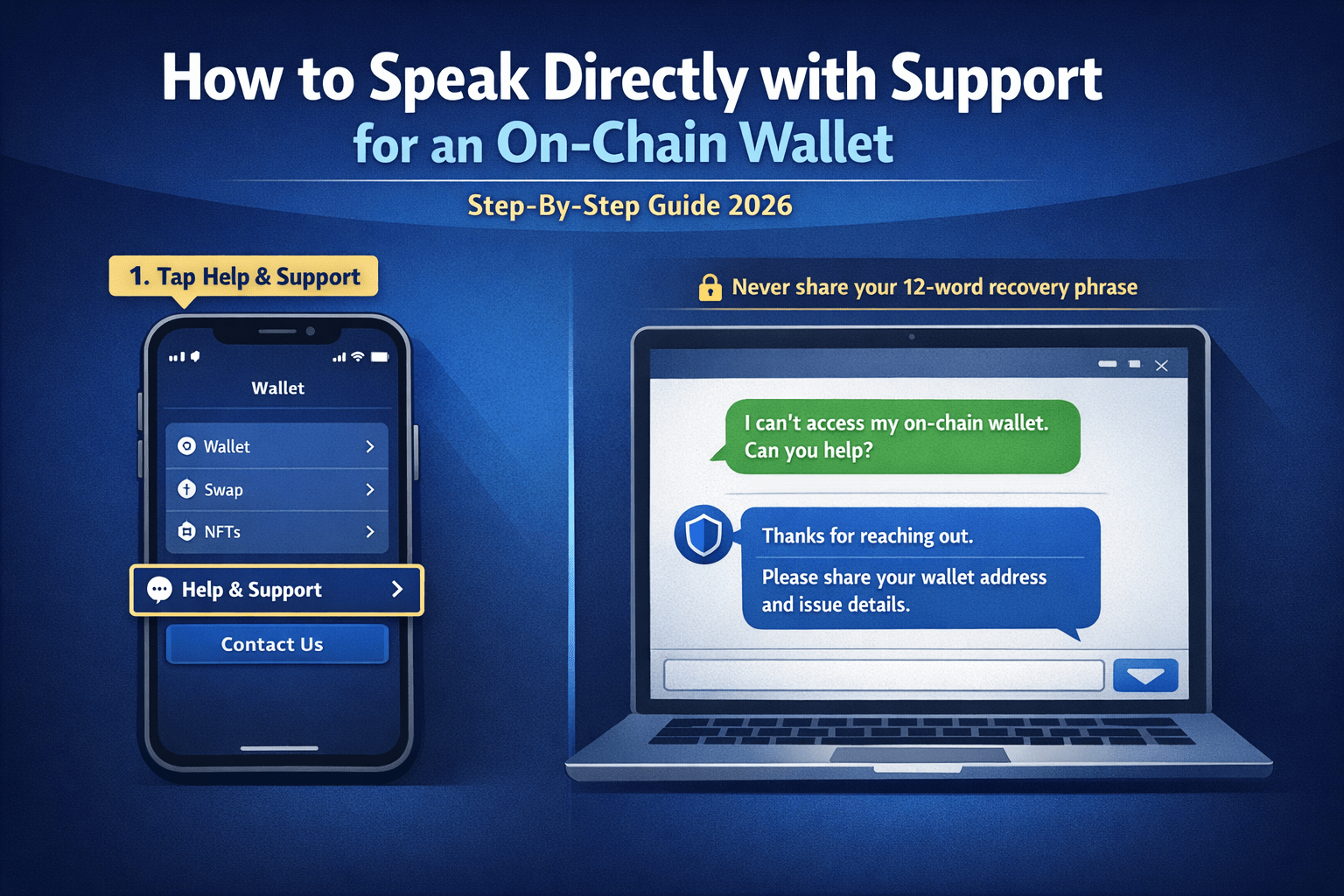
Worried about losing crypto? Can’t access your on‑chain wallet? If you’re stuck, you need to speak directly with official support — but most on‑chain wallets don’t have phone support, and scammers are everywhere. This guide shows you the real, safe ways to contact support and get help quickly.
You’ll learn:
- How to find real, official support for popular on‑chain wallets
- How to chat or email support (step by step)
- How to get help if your wallet is locked, funds are missing, or you lost your recovery phrase
- How to avoid scams while asking for help
Why “On‑Chain Wallet Support” Is Different
An on‑chain wallet (like Crypto.com Onchain Wallet, MetaMask, Trust Wallet, Phantom, etc.) is a self‑custody wallet where only you control the private keys. This means:
- You are the only one who can access your funds — no exchange or support team can “unlock” your wallet if you lose your password or recovery phrase.
- Support can only help with:
🔐 Golden Rule: Never share your 12‑word recovery phrase with anyone. Official support will never ask for it. Anyone who asks is a scammer.
How to Speak Directly with On‑Chain Wallet Support (Generic Steps)
Here’s how to safely contact support for any major on‑chain wallet:
1. Use the Official App or Website Only
- Open the official wallet app (e.g., Crypto.com Onchain Wallet, MetaMask, Trust Wallet, etc.).
- Look for:
Do not use links from Google Ads, Telegram, WhatsApp, or random YouTube videos — they are almost always fake.
2. Find the Real Support Page
Go to the official domain only, for example:
- Crypto.com Onchain Wallet →
help.crypto.com - MetaMask →
support.metamask.io - Trust Wallet →
support.trustwallet.com - Phantom →
support.phantom.app
Bookmark this page so you can return easily.
3. Choose the Right Support Option
Most on‑chain wallets offer:
- Live chat (in the app or on the website)
- Email support (submit a ticket)
- Help center / knowledge base (search for your problem)
If you need to “speak directly,” live chat is usually the closest you’ll get to real-time conversation.
4. Be Ready with Details
Before contacting support, prepare:
- Your wallet address (public address, not the 12‑word phrase)
- TxID (transaction ID) for any missing or failed transaction
- Device model, OS version, app version
- Screenshots (optional, but helpful)
The more details you give, the faster they can help.
How to Speak Directly with Support for Crypto.com Onchain Wallet
The Crypto.com Onchain Wallet is one of the most searched “on‑chain wallets,” so here’s exactly how to contact its support:
Step 1: Open the App and Go to Support
- Open the Crypto.com: Onchain Wallet app.
- Tap the menu (☰) or profile icon.
- Look for Help & Support or Contact Us.
- Tap to open the chat or support page.
Step 2: Use In‑App Chat (Best for “Speak Directly”)
- Crypto.com Onchain Wallet has an in‑app chat support.
- Describe your issue clearly:
📌 Tip: Be polite and clear. Include:
- Your CRO wallet email/phone
- Last successful action in the wallet
- Any error message shown
Step 3: Use Email / Ticket Support (If Chat Is Slow)
If chat is not available or not helping:
- Go to the official Crypto.com support page:
help.crypto.com - Select Onchain Wallet
- Choose your issue (e.g., “I can’t access my wallet”)
- Fill the form and submit your ticket
Crypto.com usually replies within 24–48 hours on urgent issues.
Step 4: What to Ask When You Speak to Support
To get help fast, ask:
- “How can I recover my Crypto.com Onchain Wallet?”
- “Can you help me if my wallet is stuck on loading?”
- “Are there any downtime or maintenance issues right now?”
Do not ask:
- “Can you send me my recovery phrase?” (they can’t)
- “Can you refund a lost transaction?” (they can’t recover wrong sends)
How to Speak with Support for MetaMask, Trust Wallet, Phantom, etc.
Most standalone on‑chain wallets (MetaMask, Trust Wallet, Phantom, etc.) don’t have phone support, but they do offer chat or email. Here’s how to reach them:
MetaMask (Ethereum / Multi‑chain Wallet)
- Official support:
support.metamask.io - Best way: Submit a ticket (search for your issue → “Submit a request”)
- Response time: 1–3 days for common issues
- MetaMask cannot recover your wallet; they can only help with app bugs or connection issues.
Trust Wallet (Binance / Multi‑chain Wallet)
- Official support:
support.trustwallet.com - Open a ticket explaining:
- App crash or login issue
- Missing funds (include TxID)
- Trust Wallet can’t return your coins if sent to the wrong address, but they can check if the wallet is working correctly.
Phantom (Solana Wallet)
- Official support:
support.phantom.app - Submit a ticket with:
- Wallet address (public)
- TxID of the problematic transaction
- Screenshots of the error
- Phantom can’t recover lost recovery phrases, but they may help with sync issues or app bugs.
When You Can Actually “Speak Directly” (Phone & Live Chat)
Very few on‑chain wallets offer phone support, but if your wallet is linked to an exchange, you can sometimes talk to a human:
- Crypto.com Onchain Wallet → If you have a Crypto.com exchange account, you can chat with Crypto.com support first, then ask about on‑chain wallet issues.
- Binance Wallet / Trust Wallet → Binance support has phone/chat support for exchange issues; Trust Wallet issues are handled via email/ticket.
- Coinbase Wallet → Coinbase support offers chat and sometimes phone; they can help with wallet login issues, but not lost recovery phrases.
For most users, live chat or ticket support is the only way to “speak directly” with on‑chain wallet support.
On‑Chain Wallet Support FAQs
Here are the most common questions users ask about contacting on‑chain wallet support:
1. How can I speak directly to on‑chain wallet support?
You can usually:
- Use in‑app live chat (if available, like in Crypto.com Onchain Wallet)
- Submit a support ticket via the official help website
- Use email/chat support on the exchange side (if the wallet is linked to an exchange like Crypto.com, Binance, Coinbase).
Phone support is rare for pure on‑chain wallets; most communication is via chat or email.
2. Does Crypto.com Onchain Wallet have phone support?
Crypto.com Onchain Wallet does not list a direct phone number for the wallet itself. Instead:
- Use in‑app chat in the Crypto.com: Onchain Wallet app
- Contact Crypto.com exchange support (they can sometimes help with linked wallet issues).
Always go through the official app or help.crypto.com — never call numbers from random websites.
3. My on‑chain wallet is not loading / not working. What can support do?
Support can help if:
- The app keeps crashing
- You can’t login (but know your passcode)
- Balance is not updating
- Transaction is stuck or failed.
They may:
- Ask you to reinstall the app
- Check wallet status / maintenance
- Guide you to check on a blockchain explorer.
They cannot “unlock” the wallet if you forgot your password and recovery phrase.
4. I lost my recovery phrase. Can support recover my wallet?
Almost always, no.
On‑chain wallets are non‑custodial, so only you know the recovery phrase. If you lose it:
- Support cannot generate a new phrase
- Support cannot transfer your funds for you
- Your wallet is usually permanently inaccessible.
This is why backing up your 12‑word phrase securely is the most important step.
5. I sent crypto to the wrong address. Can support refund it?
Support cannot:
- Cancel a blockchain transaction
- “Return” crypto sent to the wrong address
- Force a third party to return funds.
If you sent to:
- A scam address / hacker: very low chance of recovery
- A wrong but real address (e.g., ETH sent to a BTC address): funds are usually lost
- A wrong network (e.g., BEP‑20 to ERC‑20): contact support with the TxID — they may be able to help if the exchange controls the receiving address.
6. How do I contact on‑chain wallet support for funds not showing?
To get help:
- Go to the official support page for your wallet (e.g.,
help.crypto.comfor Crypto.com Onchain Wallet). - Open a ticket or use chat and provide:
Support can check if the transaction is confirmed and if there’s a syncing issue.
7. How long does on‑chain wallet support take to reply?
Typical response times:
- Live chat: minutes to a few hours (if available)
- Email/ticket: 1–3 business days for most wallets
- Emergency issues (large amounts lost): sometimes faster
Response is faster if:
- You use the correct support page
- You provide clear details (address, TxID, error message).
8. How can I avoid scams when asking for support?
To avoid losing money:
- Never share your 12‑word recovery phrase or private key with anyone.
- Never enter your recovery phrase on any website except during wallet setup or import.
- Only contact support from the official app or official website (never from Google Ads, Telegram, WhatsApp, or random YouTube videos).
If someone messages you saying “I’m Crypto.com support,” it’s 99.9% a scam.
9. Can support help if I suspect my wallet is hacked?
Support can:
- Help you recover access to your account (if it’s linked to an email/phone)
- Guide you on how to move funds to a new, secure wallet
- Advise on what to do if a scam app or website connected to your wallet.
But they cannot:
If hacked, act quickly:
- Move remaining funds to a new wallet.
- Revoke access to suspicious apps (using tools like Revoke.cash).
- Report the incident to support with details.
10. What details should I give when contacting support?
To get help fast, provide:
- Your wallet address (public)
- TxID of the transaction (for missing or wrong sends)
- Network (e.g., Ethereum, BSC, Solana)
- Device info (phone model, OS version, app version)
- Error message (if any).
The more details you give, the faster support can help.
Also Read:- Accidentally Sent USDT to Ethereum Wallet? Here’s How to Recover Safely
0 Comments